· · ─ ·✶· ─ · ·
Databases. They’re used everywhere on the internet. When we search something on Google or YouTube. When we shop online on Amazon or eBay. Ever wondered how these things can trawl through millions of records and give us back results under milliseconds? Ever wondered “How do databases find things fast?”
Recently I’ve been fascinated with them, pushing me to go past select * from employee;. To peel back the hood and understand what going on underneath… to an extent. Instead of picking up a book about databases and going through it, I figured I’d try something different, something that aligns more closely to way I think and learn. Which is by reasoning from first principles and engaging in a Socratic dialogue (typically with myself but preferably with someone who knows more about a certain topic). Hmm, whom can I bother to be painstakingly patient with me as I reason this out? Whom else other than Claude Sonnet 5 (well, I don’t have the tokens to ask Claude Fable). So this post is an abridged version of the Socratic dialogue I engaged with Claude in order to reason out the answer from first principles. This is a very effective approach to learn, especially using LLM’s without just having the LLM give you the answer.
That said, this isn’t a complete picture of everything involved in how databases search and retrieve data fast but it follows a single thread and tries to reason toward an answer from first principles.
TL;DR: Figure out how databases find things fast using Socratic dialogue with Claude.
To kick things off, let’s define our objective more specifically. As an example lets say, we have a bunch of rows with the column age and we’re running select * from <table> where age=30 query. Naturally, we want the results fast. If we we’re to iterate over all the rows, match and retrieve based on the age value, we’d be here for minutes. And we can’t have that, not in this attention economy. So to speed things up, we’ll be basically creating a database index for the age column. What’s a database index? A database index is like a yellow pages directory. For each possible value of age in our table, it links to the actual row on the hard disk (or wherever the actual row data is stored). So a O(1) way of doing this is to use a hashtable. But what’s the underlying data structure for the hashtable? The simplest one would be to use an array. We compute the hash from the age value (30 in our example) and use that as the index of the array into which we insert the appropriate row(s). Here 30 is the key and the row(s) associated with 30 is the value with regards to a typical key-value pair in a hashmap.
But complications due to key collisions arise when we use a simple array as our backing data structure. Key collision is a scenario where we want to insert a row with an age that coincidentally happens to have the same hash as another different age. The below code demonstrates this issue (a famous example in Java):
System.out.println("Ea".hashCode()); // Prints 2236
System.out.println("FB".hashCode()); // Prints 2236
If we replace the old value with the new value (associated with a particular key), then we are effectively losing the old data. In terms of our example, this would mean that we originally had a row with age 30 and then a new row with a different age value just replaced the old one. Not good.
There are two ways to solve key collisions.
First is chaining. Simple enough, when a key collision occurs we append the new value to the old value. And what’s a data structure that allows us to do this? Linked lists. Why not just use an array again? Because we would never know the size of this inner array before hand. Linked lists increase in size only when required. So what does this look like? We have an array and all the elements of this array are references to the head of a linked list.
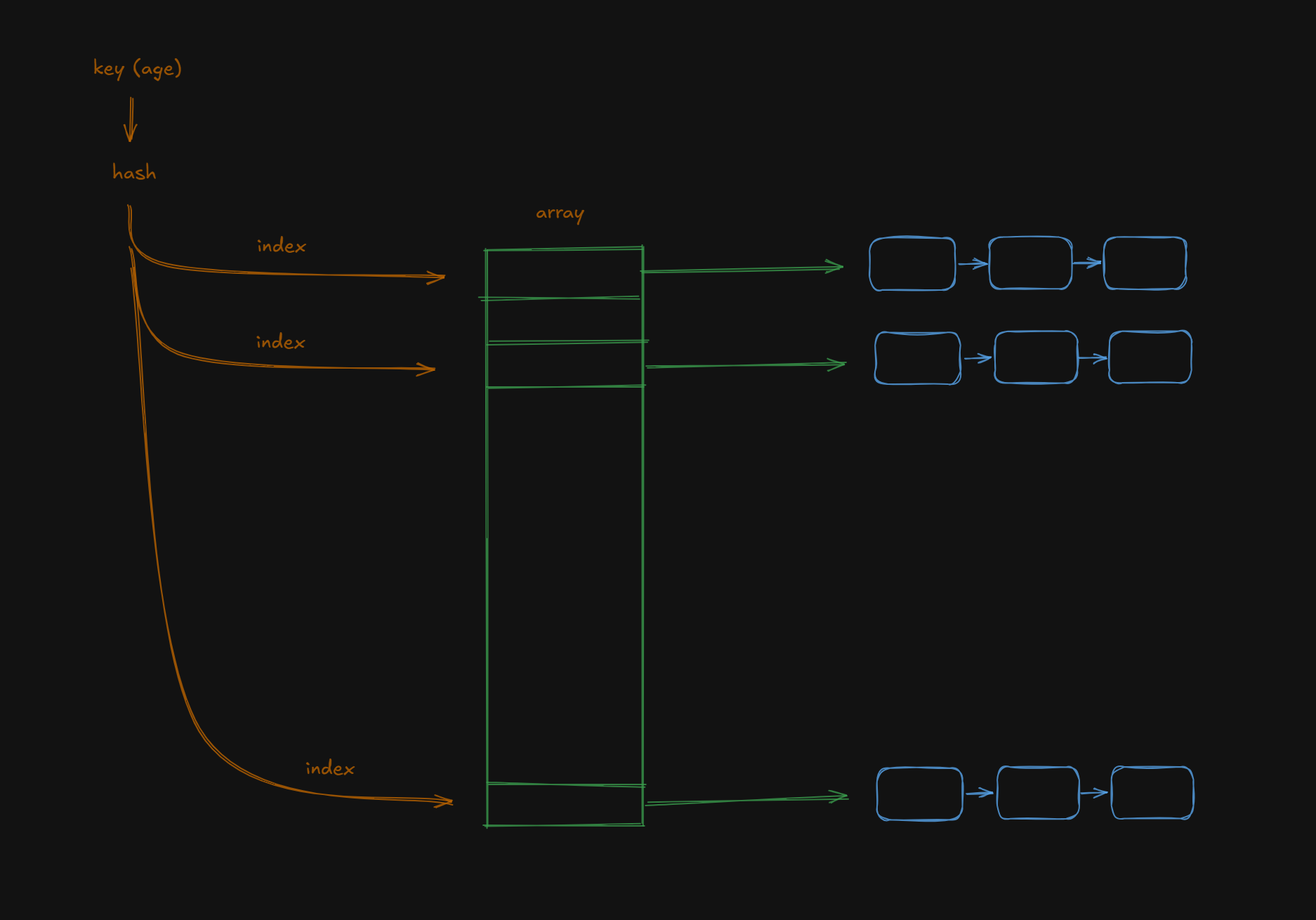
The other way to solve key collisions in a hashtable is called open addressing. Essentially, here we don’t save the new value and the old value in the same array location but instead we smartly store the new value “near” the location of the old value.
So this approach of implementing a hashtable with an array + linked list is great. Great for direct matches but not ranged queries. And now we have unlocked the next puzzle. Ranged queries. Suppose we want to do select * from <table> where age < 30. We might think the approach here would be to compute the hash of 30, use that as the index in the array and return back every item from the array less than or equal to that index. But thats not correct. When we compute hash, it scatters the keys to store them across the entire array by design. So a hash for 30 might give us the index 4 but hash for 31 would not be 5, it could be 1. The hash function is not monotonically increasing. So using an array as the backing data structure for our hashtable does not guarantee ranged queries to work properly.
So how can we handle this? Two approaches. Both drop hashing and opt for a sorted data structure. Either a sorted array or a sorted linked list.
Why are we looking at sorted data structures?. Think about it. If we now need to do select * from <table> where age < 30, we can just find the row where age is 30 and then retrieve all rows before this. Since the rows are all sorted via age, we can just retrieve all rows before this row.
Lets look at the two approaches.
-
For a sorted array, when inserting a new key-value pair, we use binary search to find where the key belongs, then shift every element after that point by one to make room for the inserted element.
-
For a linked list, everytime we insert a new key-value pair, it should be inserted in such a way that the resulting linked list is always sorted.
Note: Something important to keep in mind is that since now we aren’t using hashing, each node in the sorted array or sorted linked list has to be a node having both the key and value.
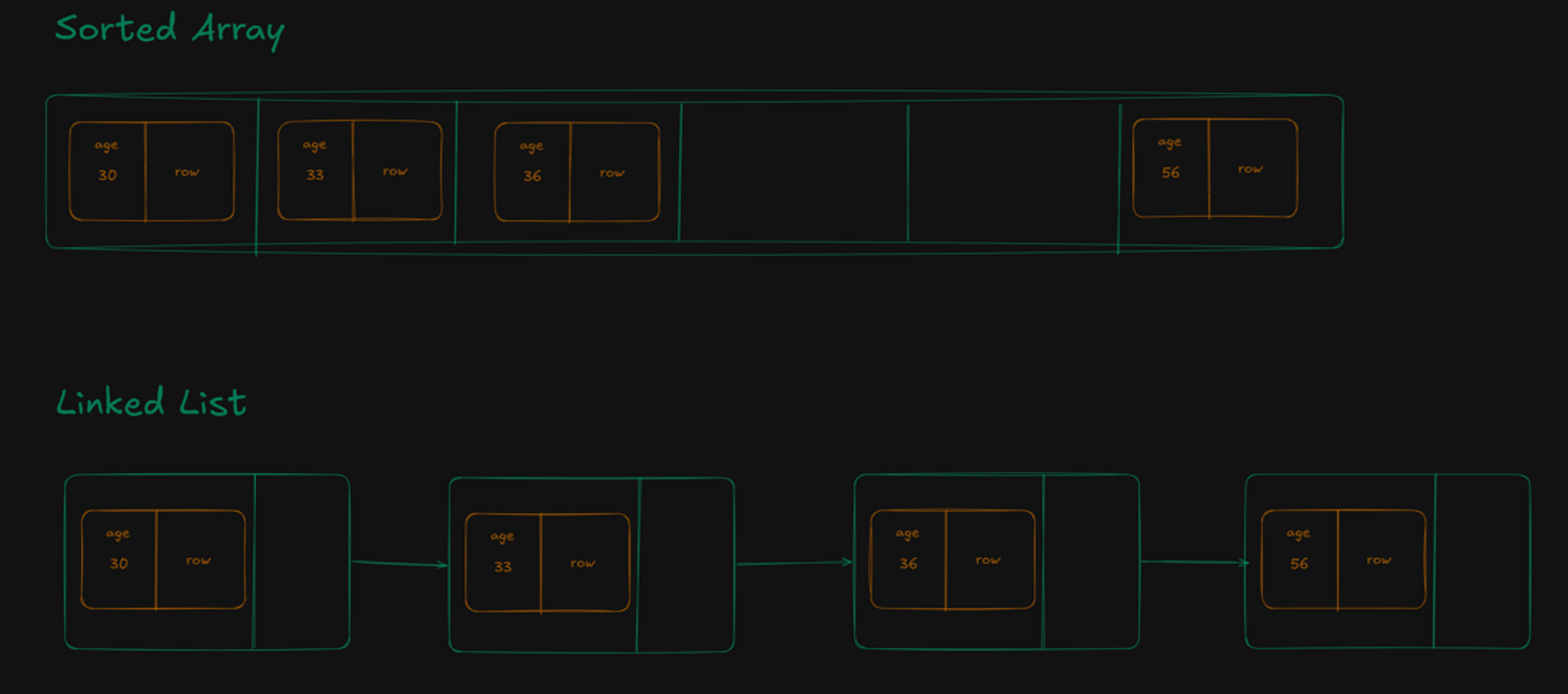
In both approaches as mentioned above, we’re no longer hashing the key. So what does a “key collision” even mean now? It’s a different problem than the one we saw with the hash table. There, "FB" and "Ea" collided purely because of how the hash function happened to map two unrelated keys to the same array slot. Here, there’s no hash function involved at all, the “collision” just means age isn’t a unique column. If a row with age=30 already exists and another row with age=30 comes in, that’s the same key showing up twice, not two different keys accidentally landing on top of each other.
So how do we handle multiple rows sharing one key in a sorted array? Two options.
First, group them explicitly — this is chaining again, just one level up: each array element becomes a node holding a key and a linked list of values, so every row for age=30 lives together under one entry.
Second, leave them ungrouped: each row stays its own separate (key, value) entry in the array, and since the array is sorted, rows sharing a key naturally end up sitting next to each other anyway. Inserting is simpler this way, it’s identical to inserting any other row but retrieving every row for a given key means scanning outward from wherever binary search lands until the keys stop matching, instead of just following one pre-built list.
Ok, great. We now have a way to handle ranged queries. Two ways in fact. Call it a day? Well…, lets take a look at their insert complexities.
For a sorted array, inserting a new key value pair would mean we need to use binary search to first find the insertion point and then after inserting in that location, we need to shift all the other items by 1. In the worst case, if we inserted right at the beginning of the array then it would be n elements. So O(log n) + O(n) = O(n).
Insert -> O(logn)
Shift -> O(n)
And what about linked lists? Inserting a new key value pair here would mean that we need to traverse the entire linked list (since in linked list we cannot do random access), to find the insertion point then just insert it. So O(n) + O(1) = O(n).
Traverse -> O(n)
Insert -> O(1)
Hmm, so both approaches require linear time complexity to insert. Not too bad but we can do better.
So the best of both worlds would be a BST (Binary Search Tree), where insert is O(log n) and search is O(log n). You know, a BST is kinda like a hybrid of a sorted array and a linked list. Its sorted like a sorted array. And it uses links like linked lists. Its a hybrid but better than both in terms of time complexity.
Hmm, a BST is better but there’s a caveat. There always is. And its better to take a look at it now. A big problem with BST’s is that they can become degenerate. Not that kind.
But if we have a series of values which are already sorted (either ascending or descending) and we insert them into the BST, then we get a tree thats basically just a linked list.
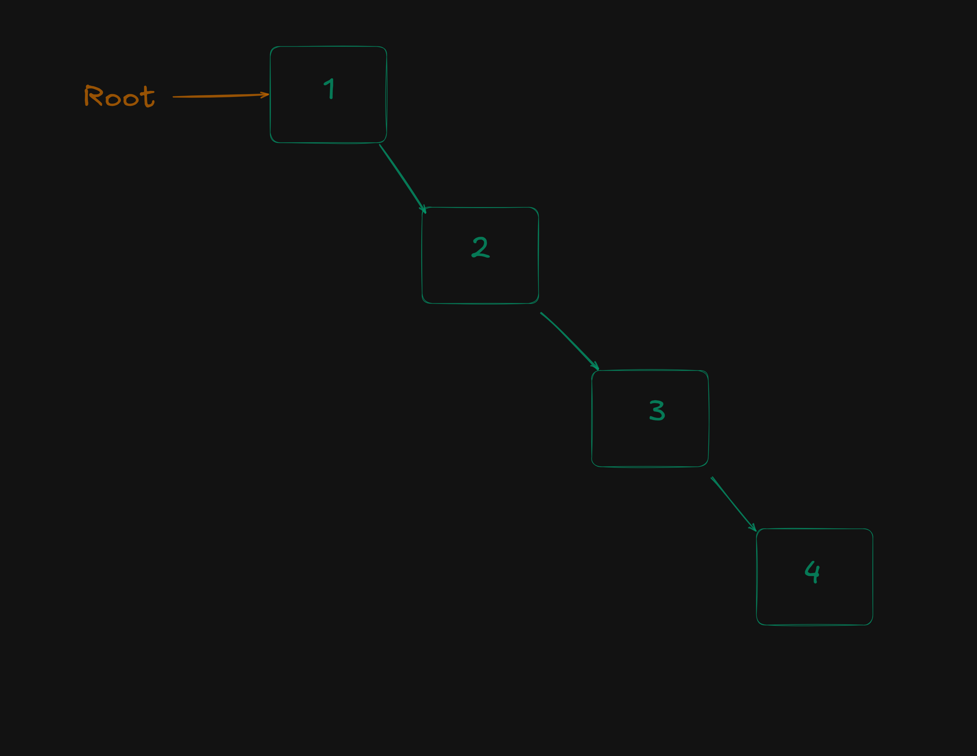
We have lost the O(log n) time complexity and its “degenerated” to O(n). Ew. How do we not become degenerates you ask? Well, we use self balancing trees. Lets quickly take a detour to understand how self balancing trees work even though this isnt the main point of this article.
Lets say we have a degenerate structure. Three nodes all in the right subtree/right child. We pick the middle element and promote it to be the root. The old root demotes and becomes the left child and the existing child node remain in its right subtree.
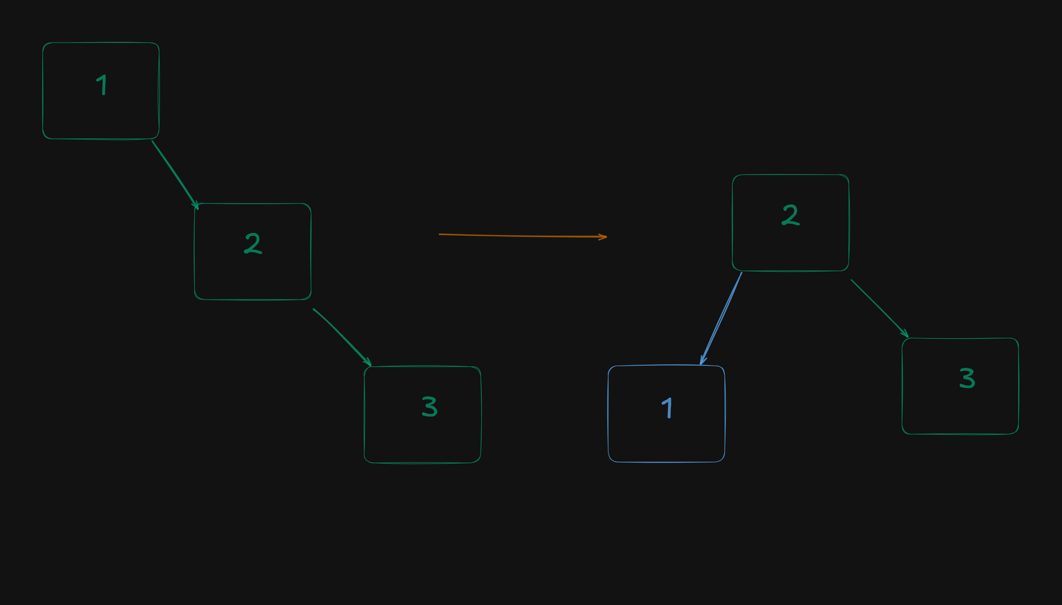
This is just a matter of arranging links so its O(1) complexity. In this case its a left rotation but there also exists a mirror scenario of right rotation for left leaning trees. These O(1) local pointer surgeries is what happens in AVL and Red-Black trees to balance them.
AVL trees need to hold an extra bit of information to balance themselves. It stores something called a “balance factor”, which is height(left subtree) - height(right subtree). So its a signed value telling which side is heavier. Also after attaching the new node in the AVL tree, does the tree need to check every node in the whole tree for imbalance? Nope, we need to check the balance factor of just the nodes we touch in the path we take to add the new element as leaf node. This is important because this means that the time complexity of balancing is O(logn).
Another detour. Do we need a separate BST as an index for each attribute? Yep, thats the idea. Obviously thats too much, so typically a default index is created for the primary key of the DB table. And the user can decide to create indexes for other attributes which they feel are being used often to retrieve data from tables so that they can efficiently query using that key/attribute. But this means that this index needs to be maintained every time a new row is inserted into the table. Thats the tradeoff, a little more time spent on the insert but retrieve becomes quick.
One more detour. Promise. If we’re not hashing then how do we get to the actual data (or row of the table) from the key? Each node of the BST holds the key and the corresponding value. The key is something like an attribute, age etc. The value is the corresponding row of the table. Now we can either store the full row in the node but more likely we store the reference to the row from the hard disk.
So a BST, we’re there. BUT WE CAN DO BETTER.
The problem with a BST is that if we have n nodes, then to search and retrieve we need log2n disk reads at worse. But if the tree can have k children instead of 2, then now that value is logkn which is much better. More specifically, a BST with 1 million rows would require log2(1 million) ~ 20 disk reads whereas a BTree with 100 branches would need log100(1 million) ~ 3 disk reads.
20 vs 3.
Thats the whole point of a BST right here. So if we have k children then we have k-1 elements in one node. A BTree is generalized version of a BST ie, it still stores the nodes in a sorted manner. Each child subtree holds values strictly between its two neighboring keys (or beyond the first/last key at the edges). That preserves total order across the whole tree.
How many keys (and hence how many children) should a node of a BTree have? The number of keys we store in a node will have to fit in the amount of data being read in a block/page. If we tried to cram more keys in a node than can be read in a block/page, then we dont fulfill the promise of one read - one node. It becomes two or more, That’s the whole tradeoff. It’s chosen to be the maximum that still fits inside one disk block/page. Any fewer, and we’re wasting a “free” disk read (we could’ve packed in more branching for the same I/O cost). Any more, and one logical node silently costs two-plus physical reads, breaking the exact promise (one level = one disk trip) that made the BTree choice worth it.
So is BTree the only data structure used in DB indexes? The base is almost always BTree in actual DB indexes. But often it not a plain BTree, there are specific optimizations tacked on to it to handle specific scenarios.
And finally lets quickly take a look at the insert operation for a BTree. Naturally its gonna be complicated because its a generalized version of BST and also it doesnt rely on additional rebalancing but instead the balancing is built into the insert. That said, there are 3 important steps in inserting a key in a BTree.
- A key in a BTree can be inserted in only leaf nodes. So given a new key-value pair, we need to find the appropriate leaf node where this key-value pair can be inserted. The decision is based on comparing the key with the values in the nodes of the BTree.
- Once we have found the appropriate leaf node, we use BinarySearch to find the appropriate location in the keys already in the node to insert the new key. We insert this key in that location and shift all the other keys by 1.
- Now since we have inserted a key into this leaf node, we need to detect for overflow. If there’s an overflow then we lift the median key to the the parent node and handle the left and right subtree. We then detect and handle overflow all the way to the root node if required.
The time complexity of the insert operation on a BTree is in two parts:
- descent
- Ascent (to handle overflow).
So its O(logkn + logkn) = O( 2* logkn) = O(logkn)
Visually, here’s how insert works in a BTree:
This is grossly oversimplified (I know because the actual implementation was one of the hardest I had to think on an algorithm), but this is a good skeleton which covers the most important details.
Phew, that was a long but we got there. So how do databases find things fast? Using database indexes. Which data structure drives a DB index? A BTree.
Appendix 1:
Here’s the full code listing for insert() in a BTree with annotations. Its huge. And complicated.
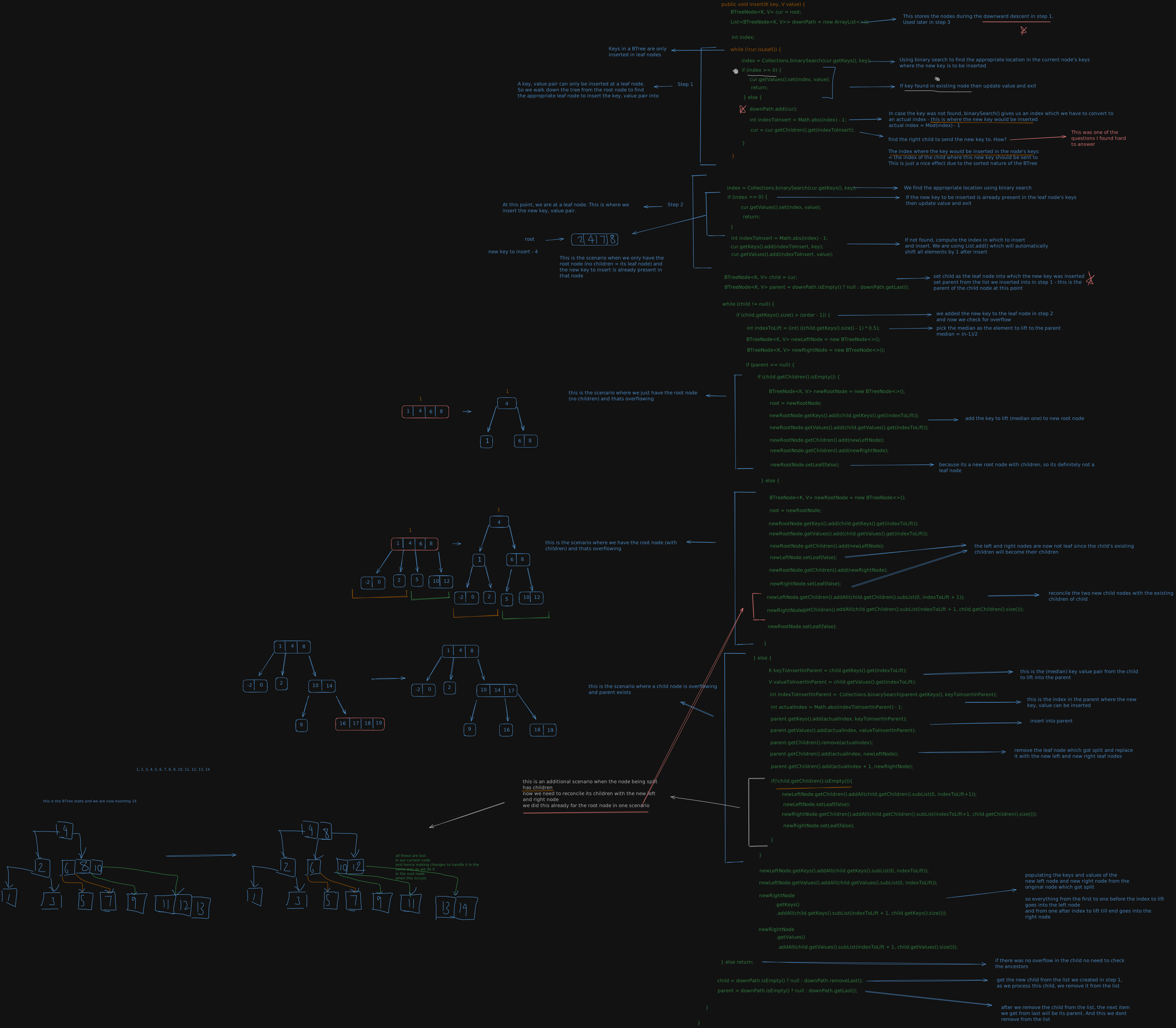
Bonus content (not really, this is actually really important):
Once we know how to insert into the BTree, the next important operation is how to retrieve keys from the BTree within specific bounds. This is what actually happens in SQL queries, for example when we do something like select * from <table_name> where age > 30 && age <= 45;. Now we want all row from the database in the range (30, 45].
I call this ranged retrieve.
It took me quite some time to understand and write out the code for this. Genuinely, I was going around in loops and had to use Claude to clean things up. But the final result is an elegant recursive function which uses inorder traversal on the BTree with smart pruning to optimize.
Here’s the psuedocode:
FUNCTION retrieveRanged(start, end, startInclusive, endInclusive)
    IF start > end
        RETURN []
    values = []                          // filled in ascending key order
    CALL collectRange(root, values)
    RETURN values

FUNCTION collectRange(node, values) -> reachedEnd
    // Invariant: the child left of keys[i] holds only keys < keys[i] (and > keys[i-1]).
    // So whether to enter a child is decided by THIS node's keys, never by the child's own.

    isLeaf = node has no children

    // first index with keys[i] >= start (binary search; the insertion point if start is absent).
    // Every child left of keys[i] is below the range, so it is skipped for free.
    i = lowerBound(node.keys, start)

    FOR i .. last key of node
        key      = node.keys[i]
        cmpStart = compare(key, start)   // -1, 0, +1
        cmpEnd   = compare(key, end)

        // 1. child left of key: all its keys are < key, so it matters only if key > start
        IF NOT isLeaf AND cmpStart > 0
            IF collectRange(child left of key, values) == TRUE
                RETURN TRUE              // end already reached below; stop all the way up

        // 2. the key itself (internal nodes hold results too, not just leaves)
        afterStart = cmpStart > 0 OR (cmpStart == 0 AND startInclusive)
        beforeEnd  = cmpEnd   < 0 OR (cmpEnd   == 0 AND endInclusive)
        IF afterStart AND beforeEnd
            append node.values[i] to values

        // 3. key >= end: every later key and child is past the range
        IF cmpEnd >= 0
            RETURN TRUE                  // skips the last-child step below

    // 4. child right of the last key: holds keys > last key, and nothing has reached `end` yet
    IF NOT isLeaf
        RETURN collectRange(last child, values)
    RETURN FALSE
Note: The ingenuity in this algorithm is in the below two lines:
afterStart = cmpStart > 0 OR (cmpStart == 0 AND startInclusive)
beforeEnd  = cmpEnd   < 0 OR (cmpEnd   == 0 AND endInclusive)
See when determining whether to add a key to the result list being returned, we need to
- check whether the key is inside the range
[start, end] - check whether
key == startand if so, shouldstartbe included in the result ie,[start, ...]or(start, ...] - check whether
key == endand if so, shouldendbe included in the result ie,[..., end]or[..., end)
All this is being checked in those two lines.
Also another thing the algorithm does it have collectRange() (the iterative function) return true or false. If it returns true then we exit the recursion. If it returns false then we keep iterating. This is where the pruning comes in.
And whats the time complexity of this algorithm?
In short its O(log_k n + m) where
k= maximum number of children a node can have in the Btree (so each node can then havek-1keys)n= total number of keys in the BTreem= total number of keys being returned in the result
Hmm. Interesting. The running time of this algorithm doesnt just depend on the input n but also the output m. Yup, this is called an output-senstive algorithm.
Here are some points I read about them online:
- In computer science, an output-sensitive algorithm is an algorithm whose running time depends on the size of the output, instead of, or in addition to, the size of the input.
- For certain problems where the output size varies widely, for example from linear in the size of the input to quadratic in the size of the input, analyses that take the output size explicitly into account can produce better runtime bounds that differentiate algorithms that would otherwise have identical asymptotic complexity.
- Output-sensitive algorithms are designed to be efficient when the output size is small compared to the input size.
But what does O(log_k n + m) mean in plain english?
Full disclosure, the below is copy pasted (lightly edited) from Claude.
O(log_k n + m) is two costs added together, and each one has a plain meaning.
The two parts
log_k n: the cost of finding where the range starts.
You start at the root and go down one level at a time, using binary search in each node to pick the child. The tree is only about log_k n levels deep, so that’s about 3 node reads for 1M keys with k = 100. You pay this once per query, whether the range holds 5 keys or 5 million.
m: the cost of handing back the answer.
Once you’re at the start, you walk forward through the keys in order and collect each one. Each key you return costs about one unit of work. If the range holds 50 keys, you do about 50 units of work. You can’t do better than this, because you have to produce all m results anyway.
So the total is: the price of finding the front door, plus the price of carrying out what’s inside.
A range query costs “find where to start” (logarithmic, tiny) plus “walk through the answer” (as big as the answer is).
And we are finally done with this thread. Congratulations on making it to the end.
· · ─ ·✶· ─ · ·