· · ─ ·✶· ─ · ·
So I was working on writing my own BTree implementation and somehow I uncovered a really nasty bug in my code. This is in Java.
I’m not gonna get into the whole code but just an abstraction that showcases the bug.
Lets say you have this code,
List<Integer> numbers = new ArrayList<>();
numbers.add(1);
numbers.add(2);
numbers.add(3);
numbers.add(1);
numbers.add(4);

numbers.removeAll(numbers.subList(0, 3));

System.out.println(numbers);
So, we’re essentially trying to delete a subset of values from numbers. What do we expect the result to be?
[4, 1]? Yea, not really. We get back [4].
Reason?
Because List.removeAll() is not position based but value based (notice the function takes values from the array as argument rather than indices as subList() does). So effectively, something like [1,2,3,1,4].removeAll([1,2,3]) will remove ALL 1,2 and 3 from the main array leaving us with 4.
Nice, we understand this. Dont use List.removeAll() when we want to do position based operations.
But did I really wanna just write the post just to explain this?
Hmm. Lets dig a little further. Next we modify our original code as below,
List<Integer> numbers = new ArrayList<>();
numbers.add(1);
numbers.add(2);
numbers.add(3);

// 4 and 1 are swapped
numbers.add(4);
numbers.add(1);

numbers.removeAll(numbers.subList(0, 3));

System.out.println(numbers);
What do we expect the result to be now? If you didnt say [4] then you’re a goddamn genius. Why are you even reading this post? Well I thought it would be [4]. Imagine my suprise when the console printed [4, 1]. But didnt we just learn how List.removeAll() works and as per that it should be [4]?
Turns out there’s more here.
Lets understand how List.removeAll() actually works.
This function scans the main array and for each element checks whether its present in the list of items to be deleted (ie, the window). If it doesnt find it then this is a survivor element (ie, should not be deleted) and is copied into the beginning of the main array (this approach is efficient for space complixity). And then gives us back that part of the array that was newly copied.
So now lets take a look at the two scenarios above.
First, when we do [1,2,3,4,1].removeAll([1,2,3]).
So main array = [1,2,3,4,1] and window = [1,2,3]
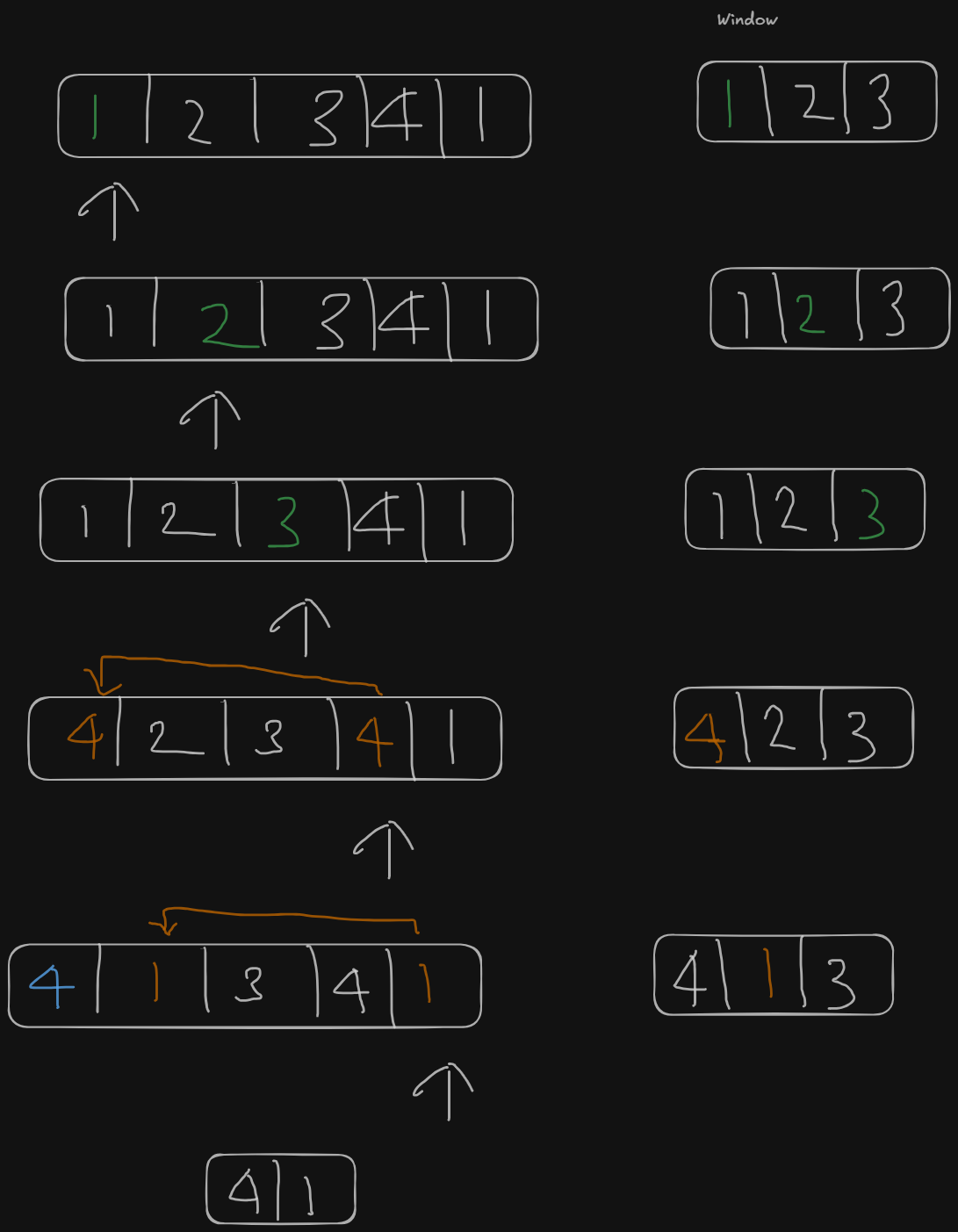
Now, lets look at when we do [1,2,3,1,4].removeAll([1,2,3]).
So main array = [1,2,3,1,4] and window = [1,2,3]
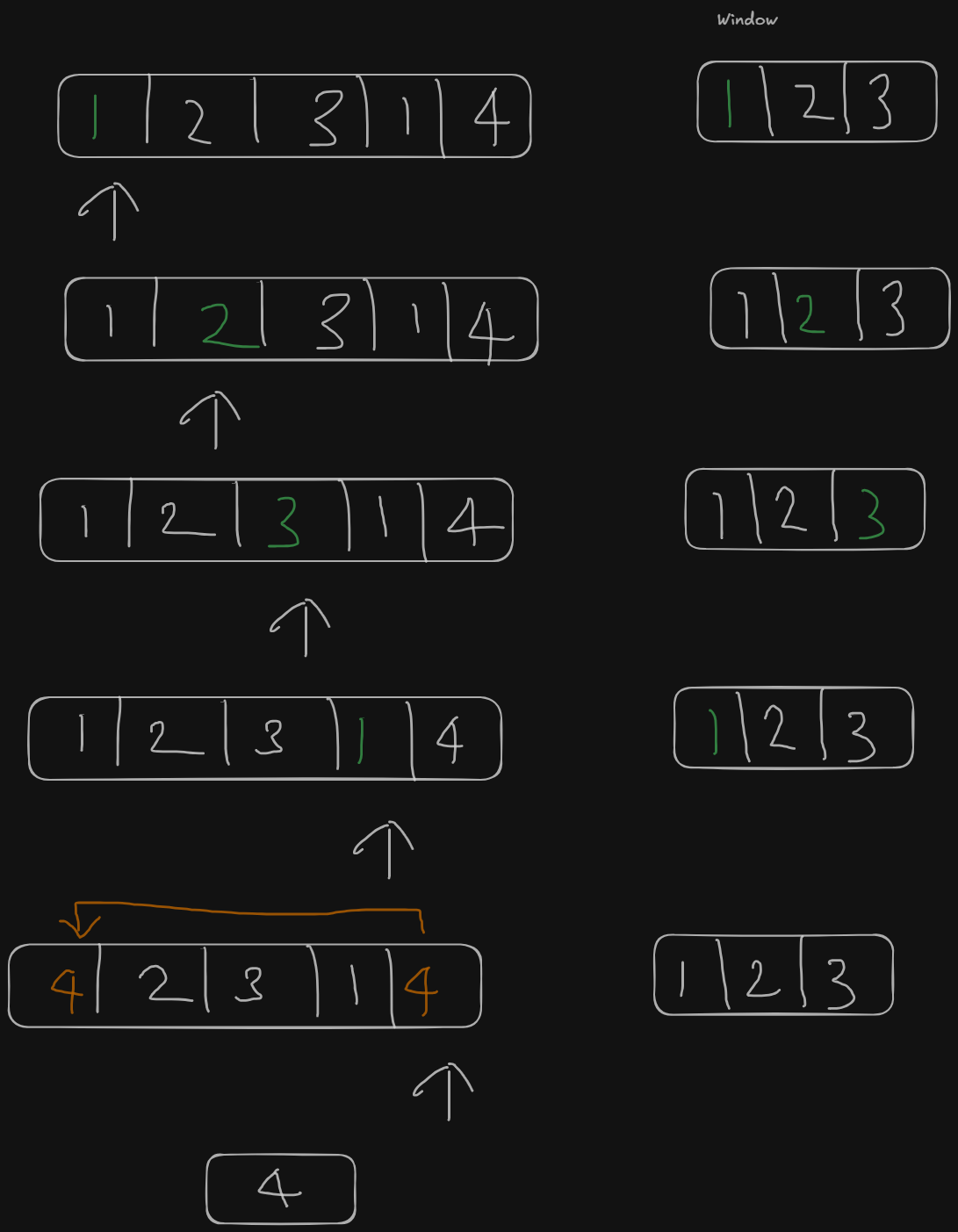
So to summarize, the reason we see two different behaviors when we flip the position of 1 and 4 at the end of the array is because the window we are using is live (as in it updates as the main array updates) and it affects the behavior of List.removeAll() as we just saw.
Yea, this is actually quite tricky.
Two learnings:
- Never use
List.removeAll()when we want to do position based removal - Never use a live window (note: we used
numers.subList()as the window)
Phew! All in a day’s work eh?
· · ─ ·✶· ─ · ·